
Your money. Your machine.
Nobody else's.
Lyncost is a private personal-finance app that runs entirely on your computer. Track spending, budgets, bills, investments and net worth — without handing your finances to the cloud.
Works offline
No internet needed. Ever.
No account
No sign-up, no bank logins.
Your disk only
One local database file.
Source available
Read every line on GitHub.
Everything in one place
A complete money manager, minus the cloud
Everything you'd expect from a modern finance app — built to run on your own computer.
Net worth at a glance
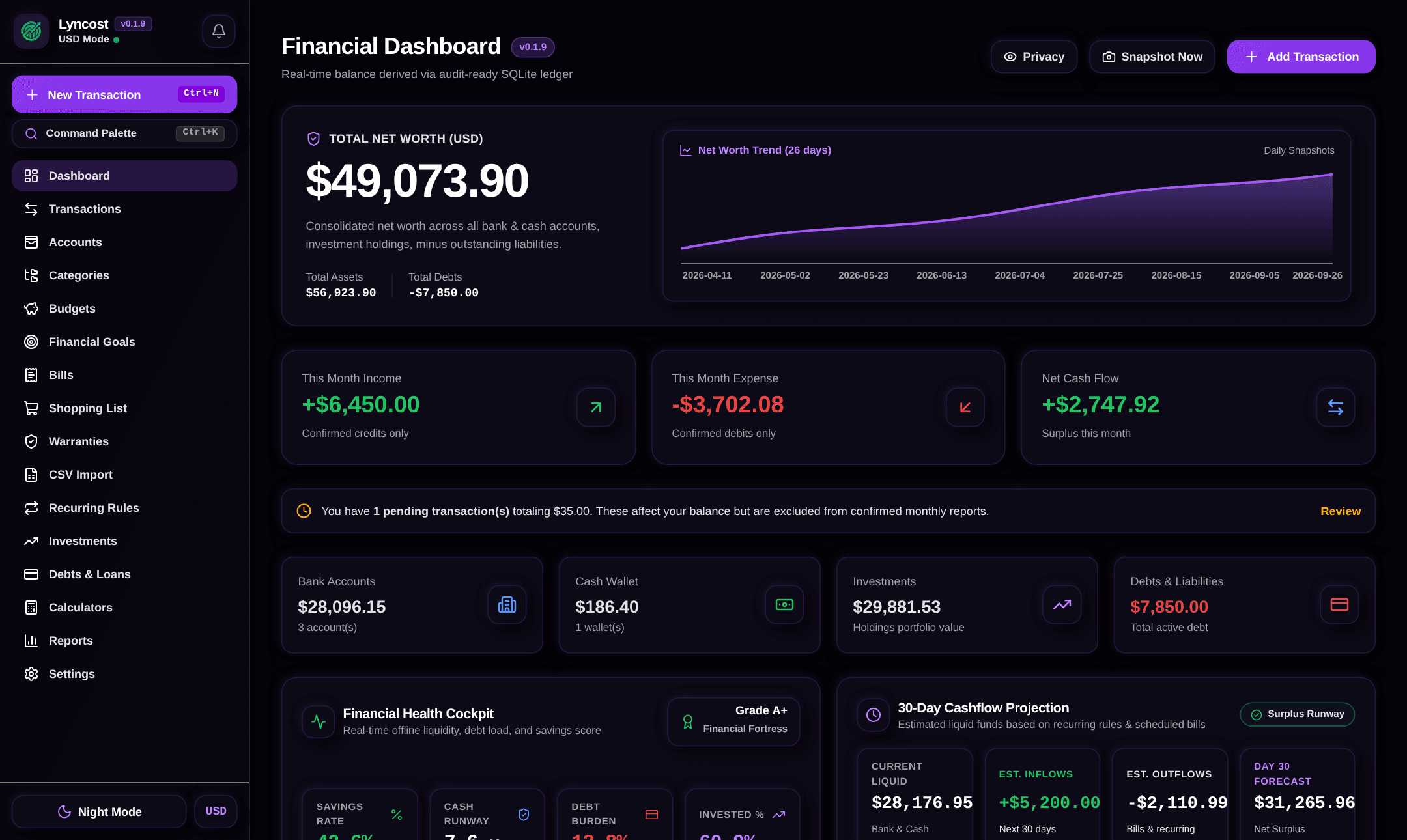
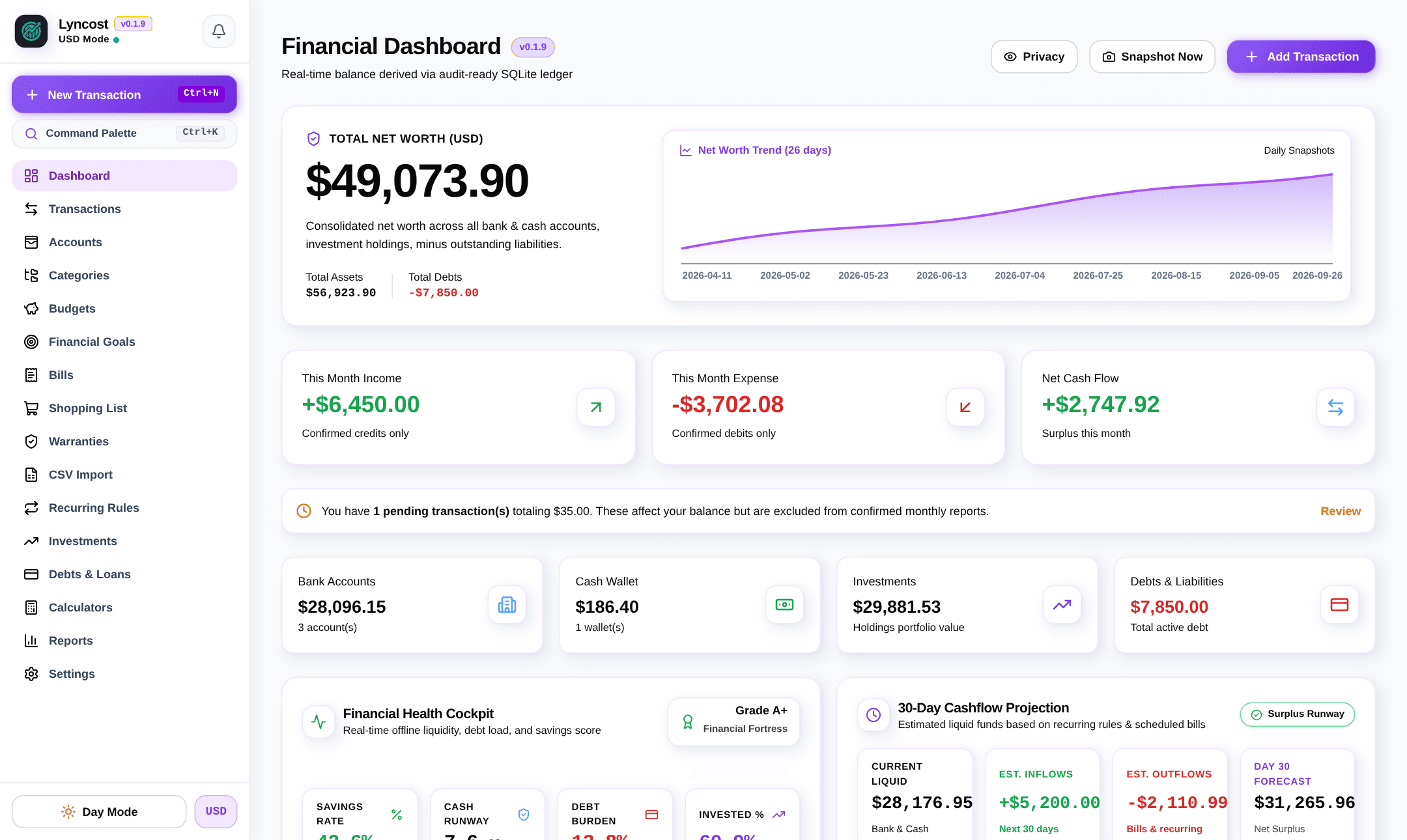
Bank, cash, investments and debts roll up into one number, with daily snapshots and a history chart.
A real ledger
Income, expenses and transfers between accounts. Balances are recalculated from every entry — never overwritten.
Budgets & goals
Category budgets that warn you when you’re spending too fast, and savings goals you can contribute to.
Bills & recurring
Due-date reminders with desktop notifications. Salary, rent and subscriptions post themselves on schedule, so your balances are always up to date.
Investments & debts
Stocks, crypto and mutual funds with profit & loss and price history. Loans and credit lines with repayments.
Any currency
Keep accounts in INR, USD, EUR or anything else, converted to your base currency with your own rates.
Reports & CSV
Spending by category, income vs. expenses, net worth over time. Import bank CSVs, export anything.
Everyday extras
Shopping list, warranty tracker, emergency-fund calculator, 30-day cash-flow forecast, financial health score and a Ctrl+K command palette.
See it in action
Real screenshots of the app — no mock-ups.
Net worth, monthly cash flow, account totals, financial health score and a 30-day forecast.
Private by design
Nothing to breach, because nothing leaves your PC
Cloud finance apps ask for your bank passwords and keep your history on their servers. Lyncost has no servers. Your data is a file on your disk that you control, back up and delete whenever you want.
The app only goes online to check GitHub for a new version, and to download it when you click Update. For protection at rest, keep your operating system's disk encryption on.
PIN lock with lockout
A 6-digit PIN protects the app. Wrong guesses trigger an escalating lockout that survives restarts.
Auto-lock
Locks itself after inactivity, or instantly with Ctrl+L.
Privacy mode
Hide every balance with one click, and blur the window when it loses focus.
Daily backups
Automatic local backups (last 10 kept). Restores are checked first and keep a safety copy.
Verified updates
Lyncost tells you when an update is out and checks every download against its SHA-256 checksum before installing.
Native & light
Built with Rust and Tauri — a small native app, not a browser tab or an Electron bundle.
Simple pricing
Free on Linux. Try Windows free, then pay once.
No subscriptions, no feature tiers. Try Windows free for 14 days, no card needed.
Linux
Ubuntu, Debian, Fedora, Arch, Mint · x86_64
Free for personal use
Installs into your home folder — no root, no sudo. Updates in one click from inside the app.
$ curl -fsSL https://lyncost.vercel.app/install.sh | bashUninstall, manual download & checksums
$ curl -fsSL https://lyncost.vercel.app/uninstall.sh | bashAdd -s -- --purge after bash to also delete your data. Or download the .tar.gz and check it against the SHA-256 checksums.
Windows
Windows 10 & 11 · 64-bit
₹799$14.99 one-time, after a free 14-day trial
- Free 14-day trial, no card needed
- Lifetime license — pay once
- Future versions included
- 14-day refund if it doesn’t work
UPI, cards & net bankingAll major international cards · Secure checkout by Razorpay · Already bought? Recover your key
macOS
Planned
Android
In development
Enjoying Lyncost on Linux?
Lyncost is built by one developer with no investors and no ads. If it saves you time, a small contribution helps keep it free on Linux and moving forward.
Questions
Something else? Get in touch.
Does Lyncost upload my financial data anywhere?
No. Your accounts, transactions and balances live in a single database file on your own computer. There are no Lyncost servers, no accounts to create and no bank logins. The app only goes online to check GitHub for a new version, and to download it when you click Update. Neither sends any of your data.
Is my data encrypted?
The app is protected by a 6-digit PIN with a brute-force lockout, auto-lock and a privacy blur. The database file itself is a standard SQLite file and is not encrypted by Lyncost, so we recommend keeping full-disk encryption (BitLocker on Windows, LUKS on Linux) turned on — the same way you would protect any sensitive document.
Why is Linux free but Windows paid?
Lyncost for Linux is free for personal use and the source code is public. The Windows edition is a one-time purchase (₹799 in India or $14.99 internationally) that funds development. There are no subscriptions.
Can I try Lyncost on Windows before buying?
Yes. Download the installer and every feature is unlocked for 14 days, no card or sign-up needed. When the trial ends, Lyncost asks for a license key; nothing you entered is deleted, and it all comes back as soon as you activate.
What happens after I buy the Windows license?
Your license key and the installer downloads appear on screen immediately and are remembered in your browser. Copy the key with the Copy button and paste it in Lyncost (from the trial banner, or when the trial ends) and it stays activated. Future versions are included at no extra cost.
I lost my license key. How do I get it back?
Open the “Recover license” page and enter the payment ID from your Razorpay receipt email (it starts with pay_) plus the email or phone number you paid with. Your key is re-issued instantly.
Which payment methods are accepted?
Payments are processed by Razorpay: UPI (Google Pay, PhonePe, Paytm, BHIM), debit and credit cards, net banking and wallets in India, and international cards in USD. We never see your card or UPI details.
Windows shows “Windows protected your PC”. Is that safe?
Yes. The installer is not yet code-signed, so Microsoft SmartScreen shows a warning for new apps. Click “More info” and then “Run anyway”. You can verify the download against the published SHA-256 checksums on GitHub.
Can I get a refund?
Yes — if Lyncost doesn't work on your Windows 10/11 PC and we can't fix it, you get a full refund within 14 days. Email darshantech@proton.me with your payment ID.
How do updates work?
Lyncost checks for new versions automatically and shows an Update button. On Linux it updates itself in one click; on Windows it downloads the new installer and runs it for you. Every download is verified against its published SHA-256 checksum first, and your data and license are kept.
Take your finances off the cloud
Set up in two minutes. Your first budget in five.